
In this article we will learn about What’s New in .NET 11. Every November I go through the same routine. A new .NET version lands, my feed fills up with “top 50 features” lists, and I still have to work out the one thing I actually care about: what changes in the code I write on Monday morning?
This year that question matters a bit more than usual. Microsoft released .NET 11 on 10 November 2026, and on that very same day .NET 8 and .NET 9 stopped getting security updates. So if your apps are still on one of those versions, you need to move anyway, and this post will help you decide where to move.
Quick answer: .NET 11 is a Standard Term Support (STS) release, supported until 14 November 2028. The biggest changes are C# 15 union types and closed hierarchies, a noticeably snappier
dotnetCLI, async validation and OpenAPI 3.2 in ASP.NET Core, EF Core 11 with cleaner SQL, and new library APIs like LINQFullJoin, Zstandard compression and one-line process execution.
Please read my previous article on Build Your First MCP Server in .NET 10 (C#) – Complete Beginner-Friendly Guide. It connects nicely with the new MCP server template that now ships inside the .NET 11 SDK.
Source code: I’ve put every example from this article in a side-by-side project, with the .NET 10 way and the .NET 11 way in matching files, so you can compare them directly: github.com/JayantTripathy/DotNet10vs11
What we will cover here?
- Release date, support window and whether you should pick .NET 11 or stay on .NET 10.
- C# 15 union types, closed hierarchies and the smaller language additions, with before and after code.
- What actually makes the SDK and CLI faster.
- New library APIs you can use from day one:
FullJoin,Process.RunAndCaptureTextAsync, Zstandard,StringStreamand JSON Lines. - ASP.NET Core 11, EF Core 11, Runtime Async and the AI tooling.
- A step-by-step upgrade checklist and the breaking changes that can surprise you.
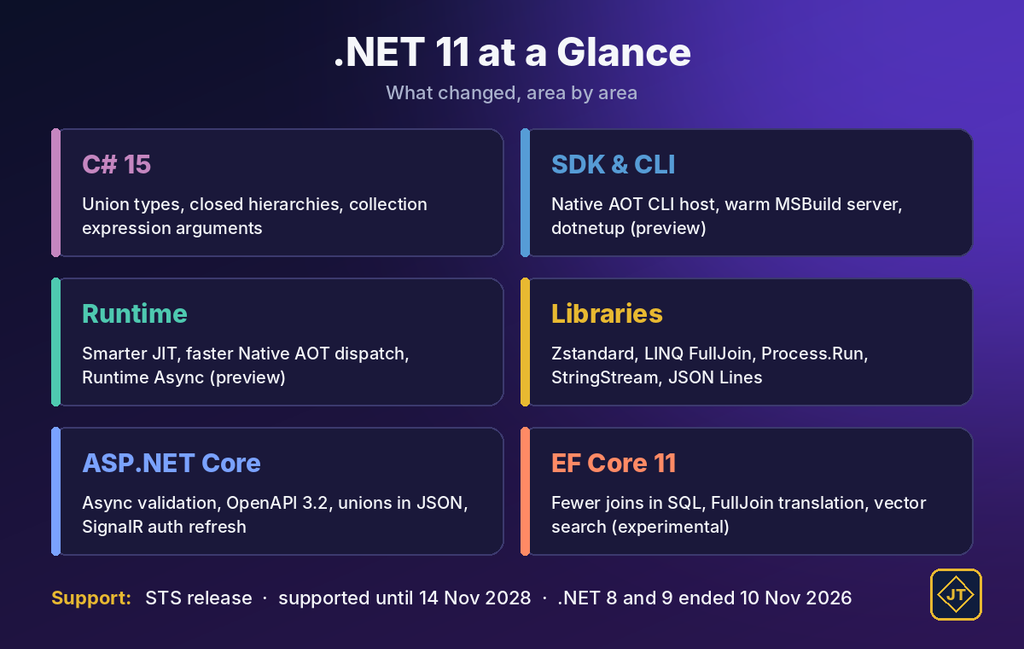
.NET 11 at a glance
| Area | New feature | Status |
|---|---|---|
| C# 15 | Union types and closed hierarchies | ✅ Stable |
| C# 15 | Collection expression arguments, extension indexers, labeled break and continue | ✅ Stable |
| C# 15 | New memory safety model for unsafe code | 🧪 Preview |
| SDK and CLI | Native AOT CLI host and warm MSBuild server, on by default | ✅ Stable |
| SDK and CLI | #:include for file-based apps, new dotnet test options, NuGet minimum package age | ✅ Stable |
| SDK and CLI | dotnetup toolchain manager | 🧪 Preview |
| Runtime | Smarter JIT, faster Native AOT interface dispatch, crash reports on Linux and macOS | ✅ Stable |
| Runtime | Runtime Async for your own code | 🧪 Preview |
| Libraries | Zstandard compression, LINQ FullJoin, new Process APIs, in-memory stream adapters, JSON Lines and union serialization | ✅ Stable |
| ASP.NET Core | Async validation, OpenAPI 3.2 by default, unions in JSON bodies, SignalR auth refresh, Blazor CacheView | ✅ Stable |
| ASP.NET Core | Blazor AI components for chat and agent UIs | ⚠️ Experimental |
| EF Core 11 | Fewer unnecessary joins, FullJoin translation, better GroupBy | ✅ Stable |
| EF Core 11 | Vector indexes and vector search for SQL Server | ⚠️ Experimental |
| AI | dotnet new mcpserver template in the SDK | ✅ Stable |
| .NET MAUI | CoreCLR as the default runtime on every platform | ✅ Stable |
| .NET MAUI | XAML incremental hot reload | 🧪 Preview |
Is .NET 11 LTS or STS?
.NET 11 is an STS release with two years of support. Microsoft follows a simple pattern: even-numbered versions are LTS (three years) and odd-numbered versions are STS (two years). Both get the same quality and the same monthly patches; only the length of support is different.
Here is the part many people miss. Because .NET 10 shipped a year earlier with three years of support, .NET 10 and .NET 11 both reach end of support on the same day.
| Version | Type | Released | End of support |
|---|---|---|---|
| .NET 11 | STS | 10 Nov 2026 | 14 Nov 2028 |
| .NET 10 | LTS | 11 Nov 2025 | 14 Nov 2028 |
| .NET 9 | STS | 12 Nov 2024 | Ended 10 Nov 2026 |
| .NET 8 | LTS | 14 Nov 2023 | Ended 10 Nov 2026 |
Should you upgrade to .NET 11 or stay on .NET 10?
Since both versions are supported until November 2028, the “LTS is safer” argument doesn’t really apply this time. My rule of thumb is simple:
- Still on .NET 8 or 9? Move now. If you want the smallest jump with fewer breaking changes, go to .NET 10. If you’re touching the code anyway, go straight to .NET 11.
- Already on .NET 10 and happy? There is no pressure. Upgrade when you want union types, EF Core 11 or the ASP.NET Core 11 features.
- Starting a new project? Start on .NET 11. You get C# 15 from the first line and the same end-of-support date as .NET 10.
Step 1 – Install the .NET 11 SDK and create a test project
- Download the .NET 11 SDK from dotnet.microsoft.com/download/dotnet/11.0.
- If you use Visual Studio, update to the latest Visual Studio 2026. In VS Code, update the C# Dev Kit extension.
- Open a terminal and confirm the installation.
dotnet --list-sdks

dotnet new console -n Net11Playground -f net11.0
cd Net11Playground
dotnet run
C# 15 is the default language version when you target net11.0, so you don’t need any LangVersion setting to try the examples below. Just replace the code in Program.cs.
What problem do C# 15 union types solve?
Think about a payment method that can end in three ways: the payment goes through, the bank declines it, or it gets flagged for manual review. Until now, C# gave us a few awkward choices to return “one of these three”:
- Return
objectand hope every caller checks the type. - Create an abstract base class that the three results don’t really belong to.
- Pull in a NuGet package like OneOf.
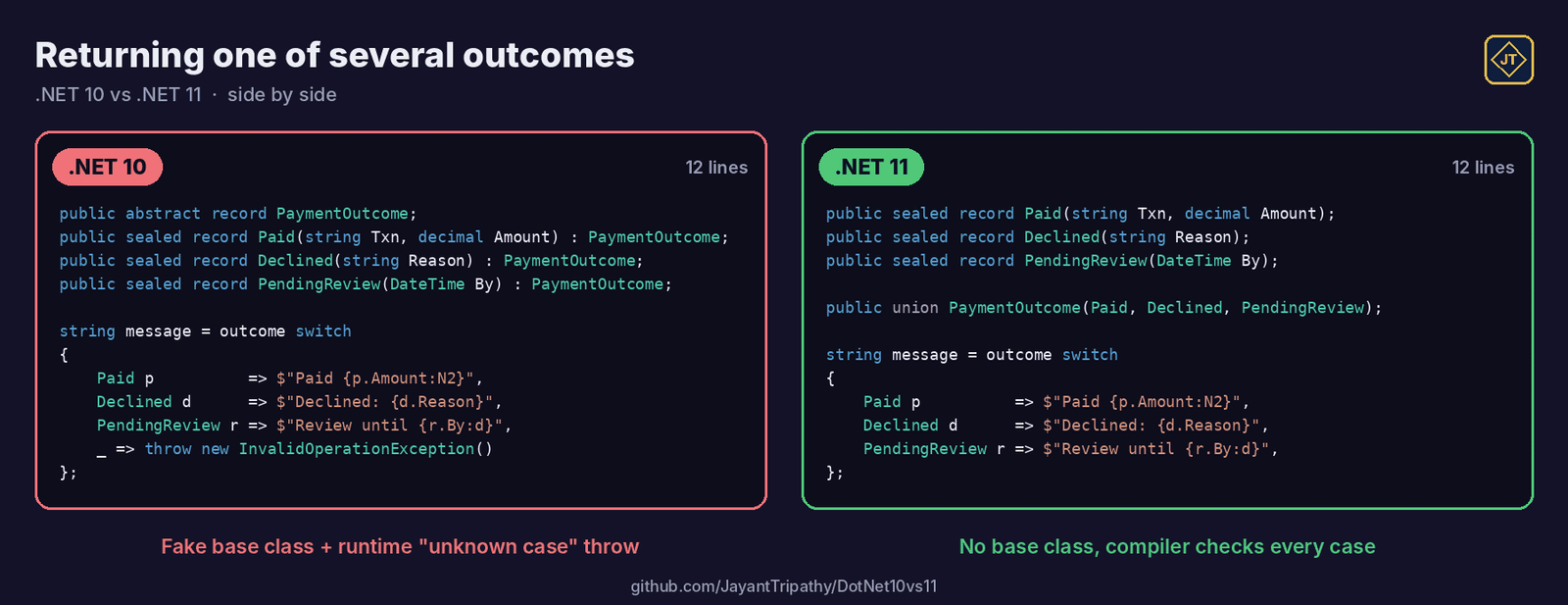
The pre-C# 15 version usually looks like this, with a “this should never happen” line at the bottom of every switch:
// Before C# 15
object outcome = paymentService.Charge(order);

string message = outcome switch
{
    Paid p          => $"Paid {p.Amount:C}, txn {p.TransactionId}",
    Declined d      => $"Declined: {d.Reason}",
    PendingReview r => $"Under review until {r.ReviewBy:d}",
    _ => throw new InvalidOperationException("Unknown result") // the compiler can't help here
};
With C# 15 you declare the allowed set of types once, using the new union keyword:
public sealed record Paid(string TransactionId, decimal Amount);
public sealed record Declined(string Reason);
public sealed record PendingReview(DateTime ReviewBy);

public union PaymentOutcome(Paid, Declined, PendingReview);
Now the method signature tells the truth, and the compiler checks every switch for you:
PaymentOutcome Charge(Order order)
{
    if (order.Total > 50_000)
        return new PendingReview(DateTime.UtcNow.AddDays(1)); // implicit conversion, no cast

    return new Paid("TXN-1001", order.Total);
}

string message = Charge(order) switch
{
    Paid p          => $"Paid {p.Amount:C}, txn {p.TransactionId}",
    Declined d      => $"Declined: {d.Reason}",
    PendingReview r => $"Under review until {r.ReviewBy:d}",
    // no default arm needed - the compiler knows these are the only three cases
};
The real benefit shows up six months later. When someone adds a fourth case, say Refunded, every switch that doesn’t handle it gets flagged at compile time instead of failing in production.
Good to know: the case types don’t need to share a base class or even know about each other. A union declared with the
unionkeyword stores its value as a single object reference, so value-type cases likeintare boxed. For most business code that doesn’t matter, but keep it in mind on very hot paths.
Closed hierarchies
Unions are great for combining types that already exist. When you own the inheritance tree yourself, C# 15 gives you closed classes instead. A closed type can only be derived from inside its own assembly, so the compiler knows the full list of subtypes and can check your patterns:
public closed record Notification;
public sealed record EmailNotification(string To, string Subject) : Notification;
public sealed record SmsNotification(string Phone, string Text) : Notification;

string Describe(Notification n) => n switch
{
    EmailNotification e => $"Email to {e.To}",
    SmsNotification s   => $"SMS to {s.Phone}",
};
My simple way to choose: use a union when the types come from different places (your records, a library type, an exception), and a closed hierarchy when the types are really a family you design together.
Smaller C# 15 additions worth knowing
Collection expression arguments let you pass constructor arguments, such as a comparer, without giving up the [...] syntax:
HashSet<string> tags =
    [with(StringComparer.OrdinalIgnoreCase), "dotnet", "DotNet", "azure"];

Console.WriteLine(tags.Count); // 2 - "dotnet" and "DotNet" are treated as the same tag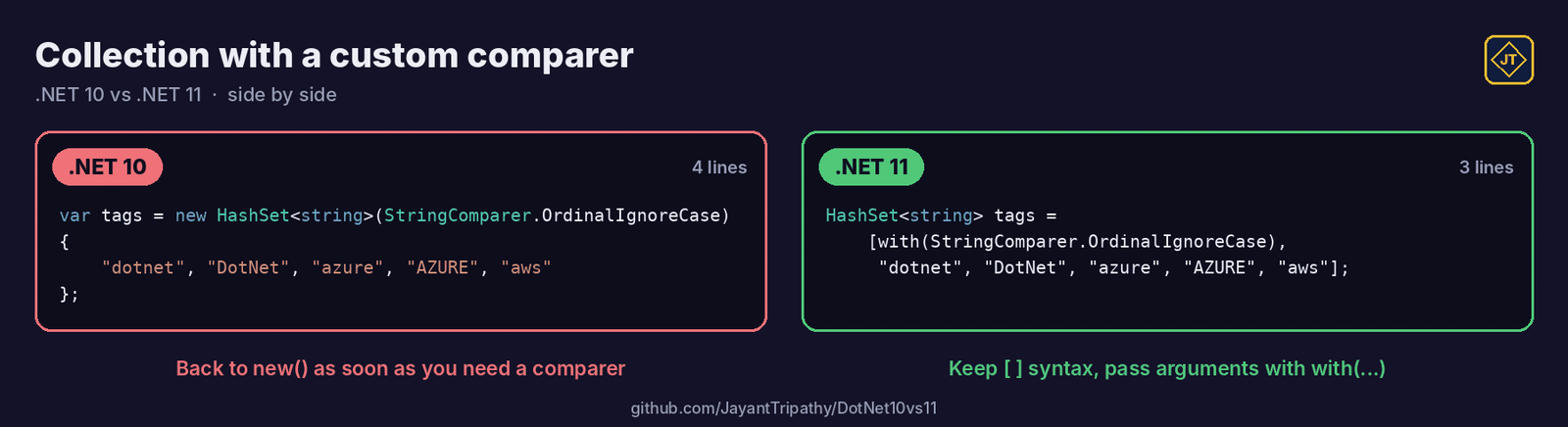
C# 15 also adds extension indexers (indexers inside the extension blocks introduced in C# 14) and labeled break and continue for leaving nested loops cleanly. The new memory safety model for unsafe code is still a preview feature, so leave it alone unless you’re experimenting.
Why does the .NET 11 CLI feel faster?
Honestly, this is the change I noticed first, because I run dotnet build and dotnet test hundreds of times a week. Two things changed:
- Native AOT CLI host, on by default. Simple commands like
dotnet --versionordotnet --help, and launching .NET tools, no longer need to start the full managed CLI first. - Warm MSBuild server, on by default. MSBuild stays running between commands, so the second and third build in a session skip a lot of startup work.
Other SDK improvements in this release:
- File-based apps (
dotnet run app.cs) can now span multiple files with#:include. - On Microsoft.Testing.Platform,
dotnet testgets run-level timeouts, a maximum failed tests limit and clearer progress output. - NuGet can wait a minimum number of days before a newly published package version is used, which is a nice extra guard against supply-chain surprises.
- dotnetup (public preview) installs and updates SDKs and runtimes in your user account, similar to what
nvmdoes for Node.js.
Library APIs you’ll actually use on day one
LINQ FullJoin for reconciliation jobs
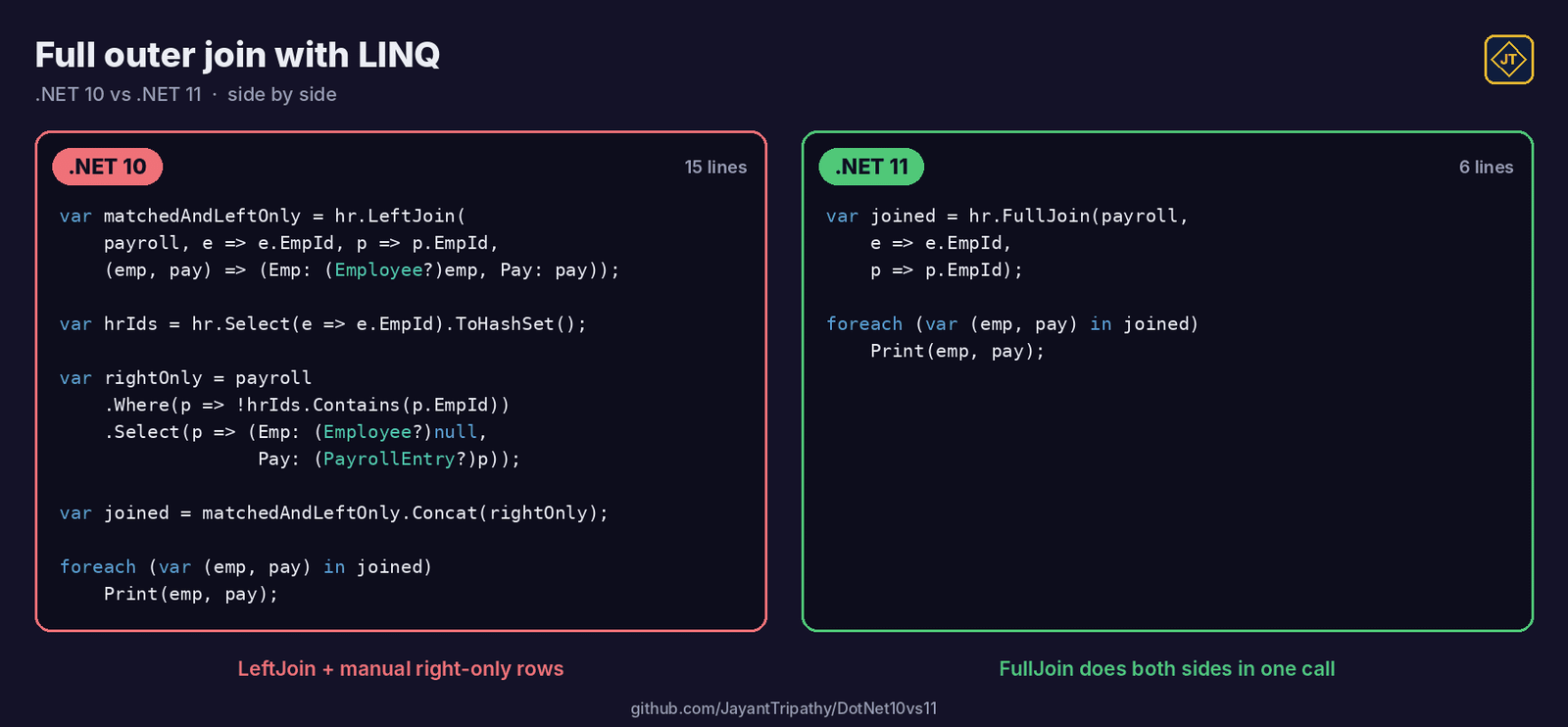
.NET 10 gave us LeftJoin and RightJoin. .NET 11 completes the set with FullJoin, which keeps unmatched rows from both sides. I hit this exact need on a project where HR data and payroll data never matched perfectly:
var hrRecords = new[]
{
    (EmpId: 101, Name: "Asha"),
    (EmpId: 102, Name: "Ravi"),
    (EmpId: 104, Name: "Meera"),
};

var payroll = new[]
{
    (EmpId: 101, Salary: 85_000m),
    (EmpId: 103, Salary: 62_000m),
    (EmpId: 104, Salary: 91_000m),
};

var reconciled = hrRecords.FullJoin(payroll, h => h.EmpId, p => p.EmpId);

foreach (var (hr, pay) in reconciled)
{
    if (hr.EmpId == 0)
        Console.WriteLine($"{pay.EmpId}: on payroll but missing in HR");
    else if (pay.EmpId == 0)
        Console.WriteLine($"{hr.EmpId} {hr.Name}: in HR but not on payroll");
    else
        Console.WriteLine($"{hr.EmpId} {hr.Name}: {pay.Salary:N0}");
}
Output:
101 Asha: 85,000
102 Ravi: in HR but not on payroll
104 Meera: 91,000
103: on payroll but missing in HR
Because the tuples are value types, the missing side comes back as default, which is why I check EmpId == 0. With reference types you would check for null instead. EF Core 11 can also translate FullJoin to SQL on providers that support it.
Running a process in one line
If you have ever written OutputDataReceived handlers just to read the output of git or another CLI, you’ll like this one. .NET 11 adds one-call helpers that start a process, capture its output and give you the exit status:
using System.Diagnostics;

ProcessTextOutput result = await Process.RunAndCaptureTextAsync("dotnet", ["--list-sdks"]);

Console.WriteLine(result.StandardOutput);
Console.WriteLine($"Exit code: {result.ExitStatus.ExitCode}");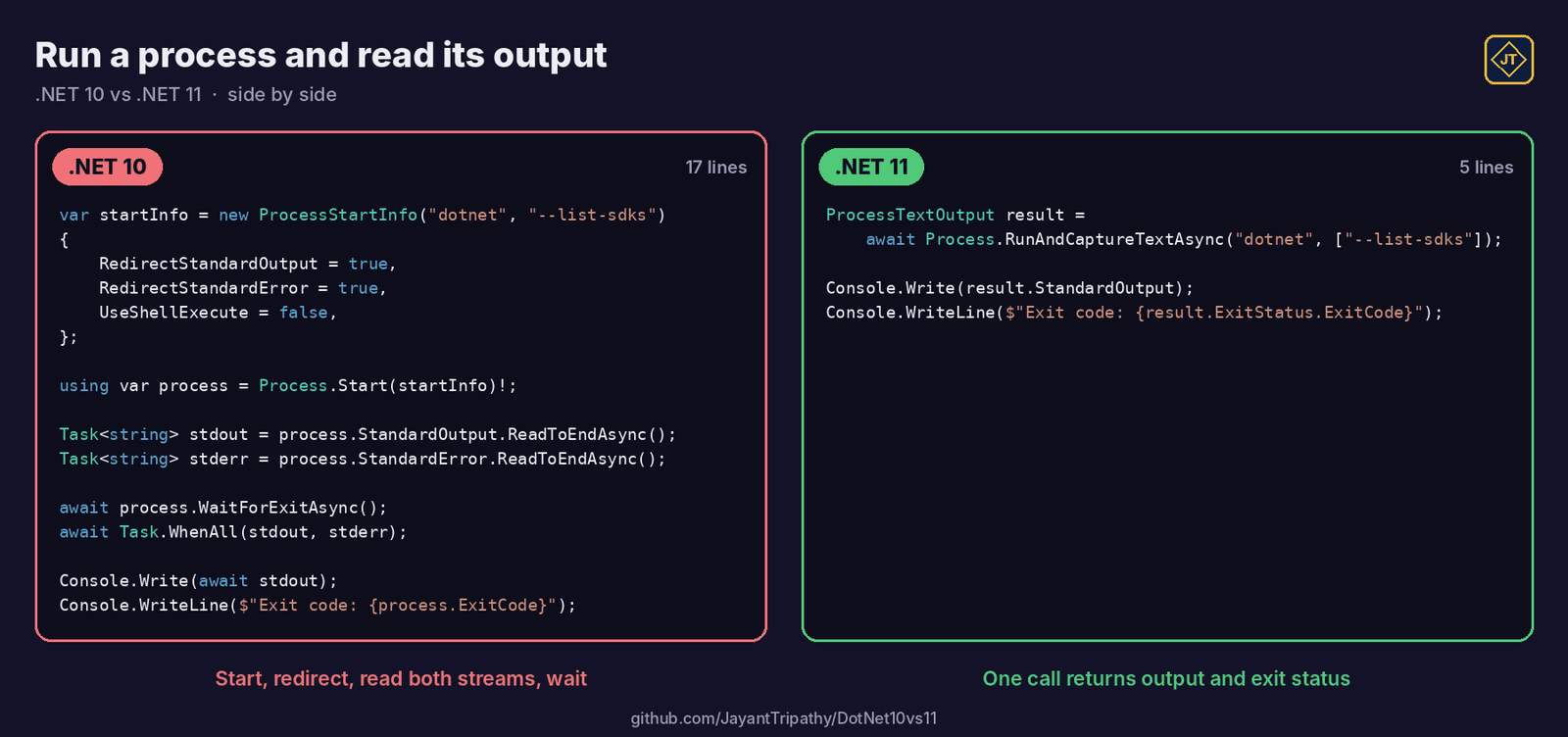
There is also Process.Run when you only need the exit status, Process.StartAndForget for fire-and-forget launches, and Process.TryGetProcessById, which returns false instead of throwing when the process doesn’t exist.
Zstandard compression, built in
Zstandard now lives in System.IO.Compression next to GZip and Brotli, so you don’t need a third-party package for it anymore. It’s a good fit for log files and large exports where you want strong compression without slow writes:
using System.IO.Compression;

await using FileStream input  = File.OpenRead("app-2026-11-15.log");
await using FileStream output = File.Create("app-2026-11-15.log.zst");
await using var zstd = new ZstandardStream(output, CompressionMode.Compress);

await input.CopyToAsync(zstd);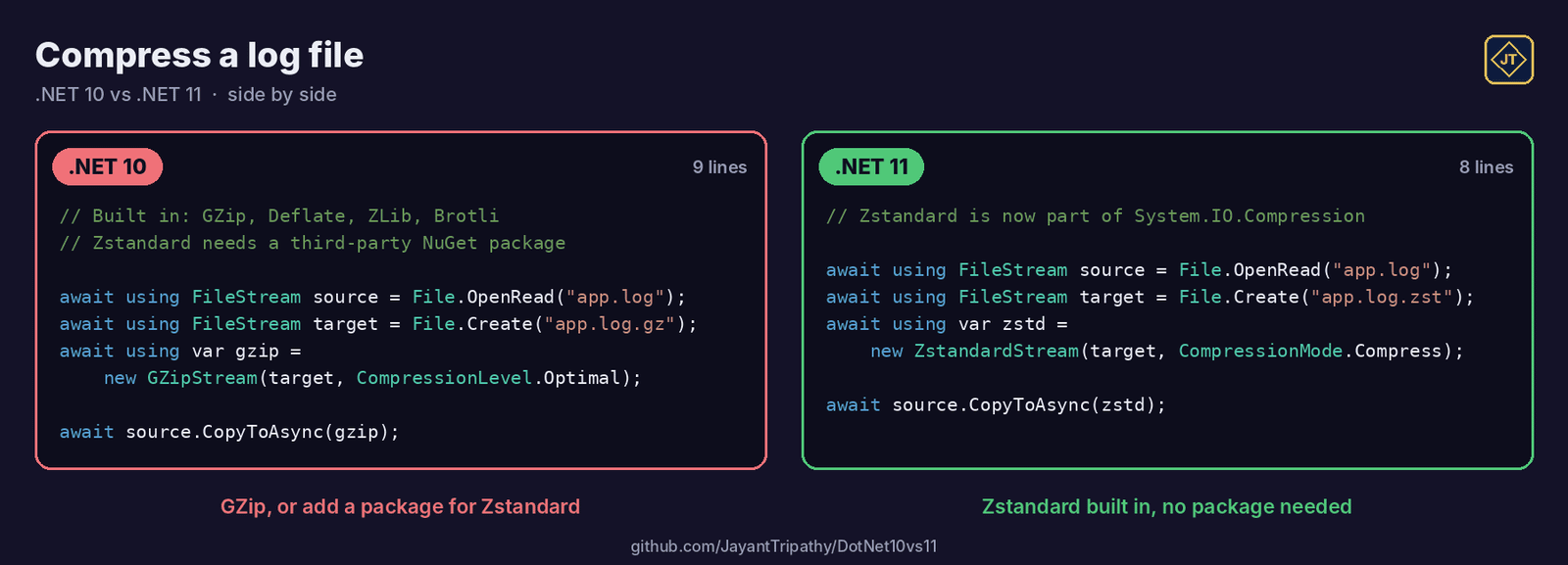
StringStream and the other in-memory stream adapters
How many times have you converted a string to a byte array just so you could wrap it in a MemoryStream for an API that only accepts Stream? .NET 11 adds four adapters that skip the copy: StringStream, ReadOnlyMemoryStream, WritableMemoryStream and ReadOnlySequenceStream.
using System.Text;

string csv = "Id,Name\n1,Laptop\n2,Mouse";

// No intermediate byte[] or MemoryStream needed
using Stream csvStream = new StringStream(csv, Encoding.UTF8);
await blobClient.UploadAsync(csvStream, overwrite: true);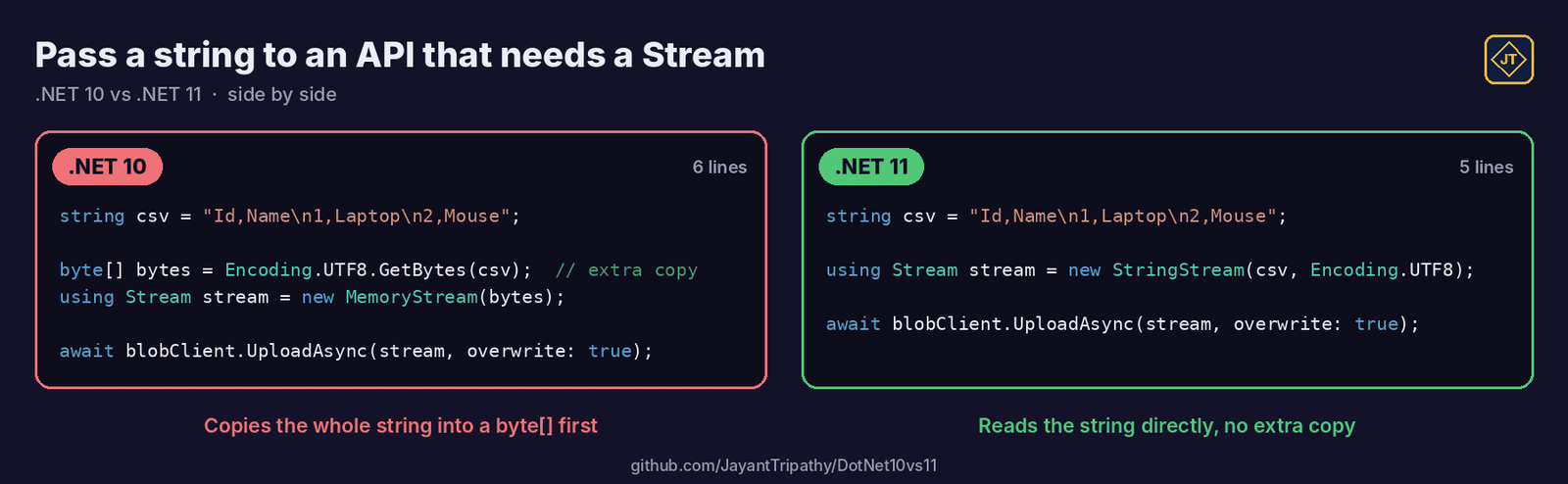
JSON Lines from System.Text.Json
JsonSerializer.SerializeAsyncEnumerable can now write JSON Lines (one compact JSON object per line) by setting topLevelValues: true. That’s the format most log pipelines, data lakes and AI fine-tuning tools expect:
await using FileStream file = File.Create("orders.jsonl");

await JsonSerializer.SerializeAsyncEnumerable(
    file,
    orderRepository.StreamOrdersAsync(),   // IAsyncEnumerable<Order>
    topLevelValues: true);

// orders.jsonl
// {"id":1,"total":499.0}
// {"id":2,"total":1250.5}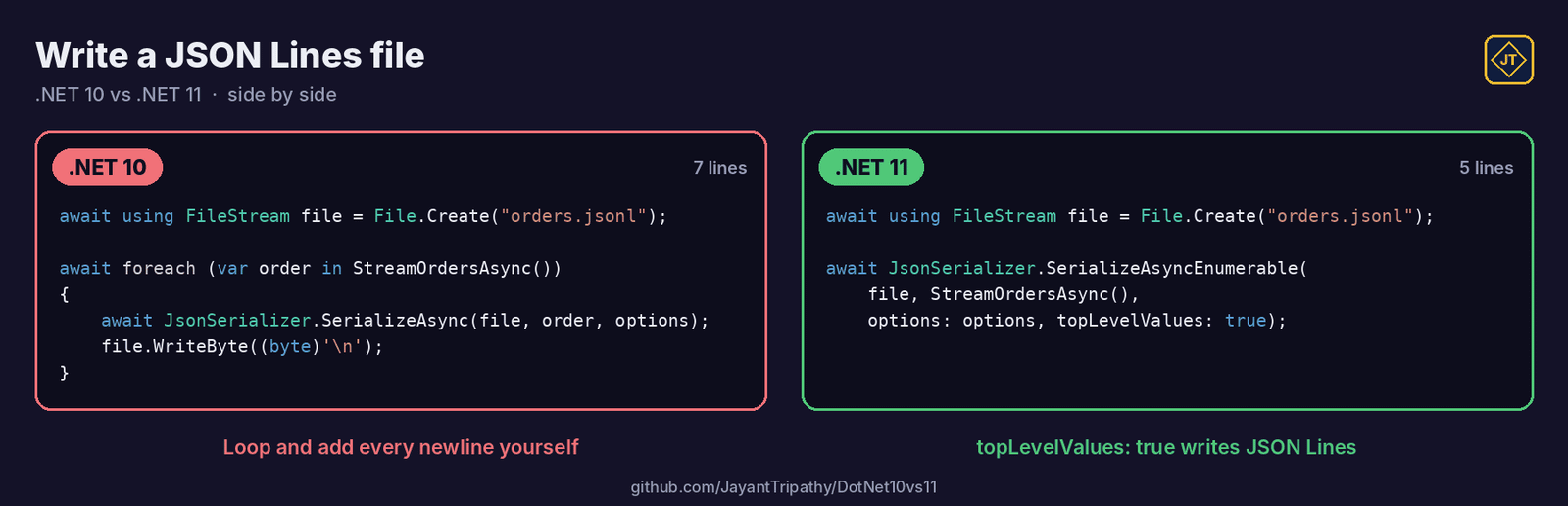
System.Text.Json also understands C# unions now. It writes the active case directly, without a wrapper or $type property, which matters for the ASP.NET Core section below.
What’s new in ASP.NET Core 11?
Async validation
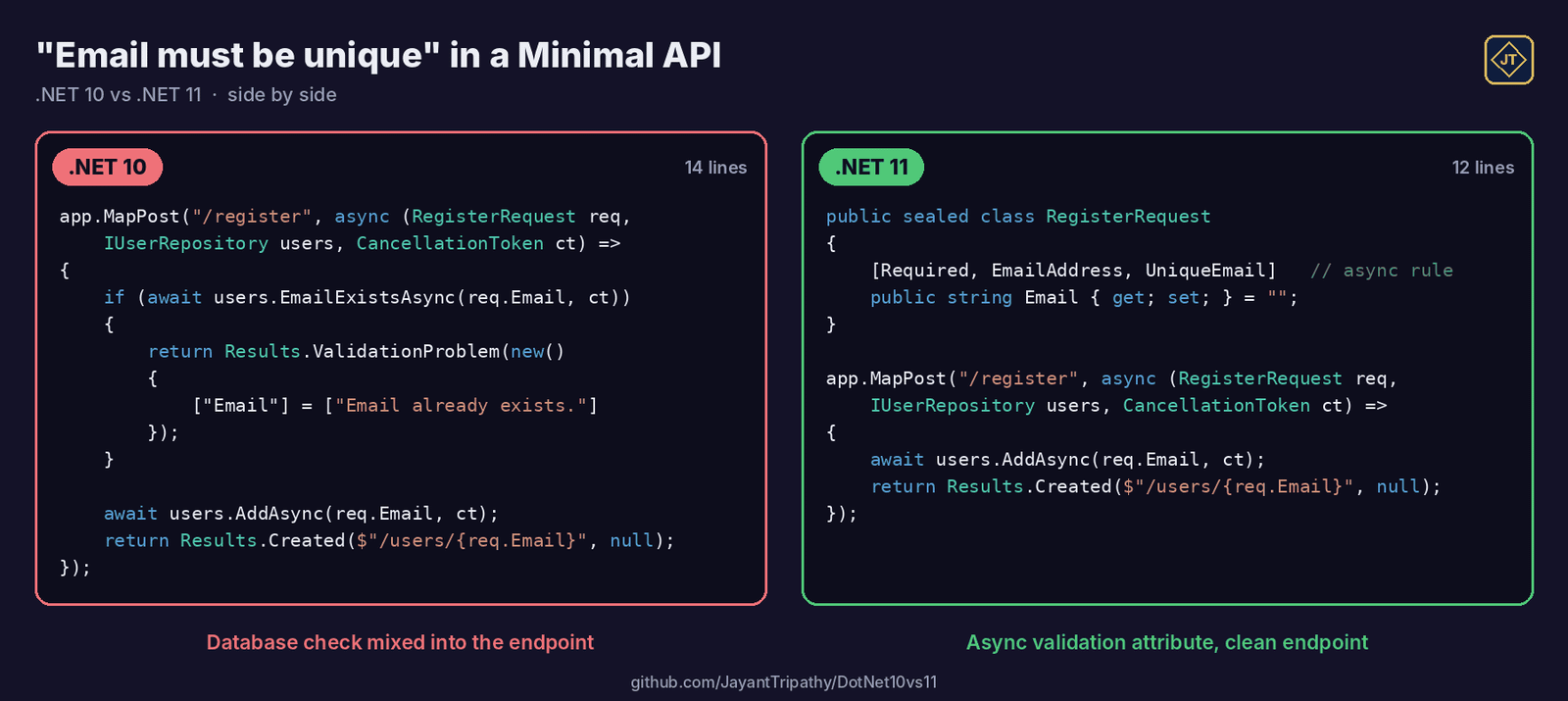
This one solves a real pain. Rules like “this email must not already exist” need a database call, and until now validation attributes were synchronous, so we either blocked a thread or moved the check into the endpoint. In .NET 11 DataAnnotations gets AsyncValidationAttribute, and Minimal APIs and Blazor forms can run it:
public sealed class UniqueEmailAttribute : AsyncValidationAttribute
{
    protected override ValidationResult? IsValid(object? value, ValidationContext context) =>
        throw new InvalidOperationException("Use the async version of this validator.");

    protected override async Task<ValidationResult?> IsValidAsync(
        object? value, ValidationContext context, CancellationToken cancellationToken)
    {
        var users = context.GetRequiredService<IUserRepository>();

        return await users.EmailExistsAsync((string?)value, cancellationToken)
            ? new ValidationResult("An account with this email already exists.")
            : ValidationResult.Success;
    }
}

public sealed class RegisterRequest
{
    [Required, EmailAddress, UniqueEmail]
    public string Email { get; set; } = "";

    [Required, MinLength(8)]
    public string Password { get; set; } = "";
}
Options validation gets the same treatment through IAsyncStartupValidator, so your app can fail fast at startup when, for example, a configured backend URL isn’t reachable.
OpenAPI 3.2 by default and unions in your API
Generated OpenAPI documents now use version 3.2. One useful addition is that the document can describe each event in a server-sent events stream. If a client generator in your pipeline doesn’t support 3.2 yet, you can pin the older version:
builder.Services.AddOpenApi(options =>
{
    options.OpenApiVersion = Microsoft.OpenApi.OpenApiSpecVersion.OpenApi3_1;
});
You can also return a union like PaymentOutcome straight from a Minimal API or MVC action. The JSON body contains whichever case is active, and the OpenAPI document describes the options with an anyOf schema. Two limits to remember: this works for JSON bodies only (not route, query, header or form binding), and if two cases have the same JSON shape you need a classifier so the deserializer can tell them apart.
SignalR and Blazor updates
- SignalR authentication refresh: long-lived connections can refresh their token without disconnecting.
- CacheView component: caches the rendered HTML of a component subtree during static server-side rendering, so expensive, mostly static sections aren’t rebuilt on every request.
- Circuit pause on inactive tabs: Blazor Server apps can opt in to free memory and the SignalR connection when a user leaves a tab idle.
- Client-side validation for static SSR forms, and
QuickGridandVirtualizecan now scroll to a specific item.
What’s new in EF Core 11?
EF Core 11 is mostly about better SQL. It removes unnecessary joins in more reference-navigation and split-query cases, translates GroupBy better and supports the new FullJoin. You don’t change your LINQ; the generated SQL just gets leaner. Complex types and JSON columns also work with TPT and TPC inheritance now.
For SQL Server, EF Core 11 adds vector indexes and approximate vector search, which is handy for RAG-style apps. Microsoft marks these APIs as experimental, so I would test them on a side project before production. Also note: EF Core 11 requires .NET 11, so you can’t use it on a .NET 10 app.
Runtime and performance: what changes without touching code?
Some improvements arrive just by running on the new runtime. The JIT removes more redundant bounds checks, devirtualizes more calls and folds more constants. Native AOT apps get faster interface dispatch, and Linux and macOS now get in-process crash reports with the managed stack trace before the process exits. As always, measure with your own workload rather than trusting general numbers.
Runtime Async is the big long-term change. It moves async/await handling from compiler-generated state machines into the runtime, which gives cleaner live call stacks in debuggers and profilers. The .NET libraries themselves are already built this way, but for your own code it’s still a preview you opt into per project:
<PropertyGroup>
  <Features>runtime-async=on</Features>
</PropertyGroup>
I would keep this to test projects for now and check that your profilers, APM agents and diagnostics still behave as expected.
AI and MCP in .NET 11
In my MCP article I had to install a separate template package first. In .NET 11 the MCP server template ships with the SDK, built on the official MCP C# SDK, with a working sample tool:
dotnet new mcpserver -o OrdersMcpServerFor calling models, Microsoft.Extensions.AI gives you IChatClient and IEmbeddingGenerator with normal dependency injection, and Microsoft Agent Framework builds agents and workflows on top of it. These come as NuGet packages, so you can use them on .NET 10 too. The new Blazor AI components for chat UIs are experimental and stay prerelease through .NET 11.
Step 2 – Upgrade an existing project to .NET 11
Follow these steps for an existing .NET 8, 9 or 10 project:
- Install the .NET 11 SDK on your machine and on your build agents. This is the step people forget, and the pipeline fails the next morning.
- If your repository has a
global.json, update the SDK version. - Change
TargetFrameworktonet11.0in each project. Keep platform suffixes like-androidor-windowswhere you have them. - Update NuGet packages, especially
Microsoft.AspNetCore.*,Microsoft.EntityFrameworkCore.*andMicrosoft.Extensions.*, to their 11.x versions. - Update Docker base images to the
11.0tags. A framework-dependent web app also needs the ASP.NET Core 11 runtime in the image. - Build, run your tests and check the breaking changes listed in the next section.
{
  "sdk": {
    "version": "11.0.100",
    "rollForward": "latestFeature"
  }
}
<PropertyGroup>
<TargetFramework>net11.0</TargetFramework>
<Nullable>enable</Nullable>
<ImplicitUsings>enable</ImplicitUsings>
</PropertyGroup>Remember: installing the new SDK alone doesn’t upgrade your app. Until you change the target framework, your project keeps building for the old version, just with the newer tooling.
Breaking changes that can surprise you
- Higher minimum CPU requirements. The .NET 11 runtime needs more modern x64 and Arm64 instruction sets. Old build servers or very old VMs are worth checking first.
- Decimal and double conversions are now correctly rounded. Converting the
doubleliteral1.23todecimalcan give different last digits than before. If a value is meant to be decimal, write1.23m. Tests that compare stored values may need updating. - ZIP files are checked with CRC32. A corrupted or truncated archive that used to open quietly now throws
InvalidDataException. - Empty GZip and Deflate streams now write a valid header and footer, so “empty” output is no longer zero bytes.
- .NET MAUI now runs on CoreCLR by default, and the
Microsoft.Maui.Controls.Compatibilitypackage is gone. Test navigation, custom handlers and trimmed builds.
The full list is on Microsoft Learn under Breaking changes in .NET 11.
What I would use first
- Union types for service results. Methods that return “success or one of a few failures” are the perfect first use, and they replace a lot of exception-driven flow.
- Async validation for any “must be unique” or “must exist” rule in a Minimal API.
- Process.RunAndCaptureTextAsync in build scripts and internal tools.
- Not yet: Runtime Async, EF Core vector search and Blazor AI components. They are interesting, but they’re still preview or experimental.
Key takeaways
- .NET 11 was released on 10 November 2026 as an STS release, supported until 14 November 2028, the same date as .NET 10.
- .NET 8 and .NET 9 are out of support, so plan your move now.
- C# 15 union types give you compiler-checked “one of these types” results without a base class or a NuGet package.
- The CLI is faster thanks to a Native AOT host and a warm MSBuild server, both on by default.
- ASP.NET Core 11 adds async validation and OpenAPI 3.2; EF Core 11 produces cleaner SQL but needs .NET 11.
Frequently Asked Questions
When was .NET 11 released?
Microsoft released .NET 11 on 10 November 2026, on the first day of .NET Conf 2026.
Is .NET 11 an LTS release?
No. .NET 11 is a Standard Term Support (STS) release with two years of support, until 14 November 2028. The next LTS release will be .NET 12.
Which C# version comes with .NET 11?
C# 15. It’s the default language version for projects that target net11.0, and it includes union types, closed hierarchies, collection expression arguments, extension indexers and labeled break and continue.
Do I need Visual Studio 2026 for .NET 11?
Microsoft recommends an up-to-date Visual Studio 2026. You can also use VS Code with the C# Dev Kit extension, or just the .NET 11 SDK and the command line.
Can I use EF Core 11 with .NET 10?
No. EF Core 11 requires the .NET 11 runtime. If you need to stay on .NET 10, keep using EF Core 10.
Is Runtime Async enabled by default in .NET 11?
Not for your code. The .NET libraries are compiled with Runtime Async, but your own projects only use it when you add <Features>runtime-async=on</Features>, and it’s still marked as preview.
Conclusion
Thanks for reading this article. We discussed here What’s New in .NET 11, from C# 15 union types and the faster CLI to ASP.NET Core 11, EF Core 11 and the new library APIs. For me, union types and async validation are the two features that will change how I write everyday code, while Runtime Async is the one to watch for .NET 12.
If you’re still on .NET 8 or 9, don’t wait: pick .NET 10 or .NET 11, follow the upgrade checklist above, and run your tests. You can clone the DotNet10vs11 repository to try every example on your own machine. In the next articles, I’ll go deeper into union types in a real ASP.NET Core API.
Leave behind your valuable queries and suggestions in the comment section below. Also, if you think this article helps you, do not forget to share this with your developer community. Happy Coding 🙂
Related Articles
- What’s New in .NET 11: C# 15 Unions, Faster Tooling and Everything Developers Should Know
- Build Your First MCP Server in .NET 10 (C#) – Complete Beginner-Friendly Guide
- Run Local LLMs in .NET: Rapid Prototyping with Ollama & Semantic Kernel
- 🔐 Securing .NET Core Web Apps with Azure AD/Intra and MSAL
- Step-by-Step Guide to Using Azure Redis Cache in ASP.NET Core 9 Web API
- Building Real-Time Messaging with Kafka and .NET Core
- How to Build a serverless CRUD app with Azure function and Cosmos DB
- .NET 8 Authentication with Identity in a Web API using Bearer Tokens and Cookies
- How to convert Text To Speech With Azure Cognitive Services using Angular and .Net Core
- CRUD operation using the repository pattern with .Net 8, Ef-Core, and MySQL
